

This feature enables a landlord or property manager to schedule a change to the rental amount for a future date. A common use case would be for processing lease renewals. Since this typically happens a few months ahead of time, you can use this feature to schedule the rent payment change ahead of time.
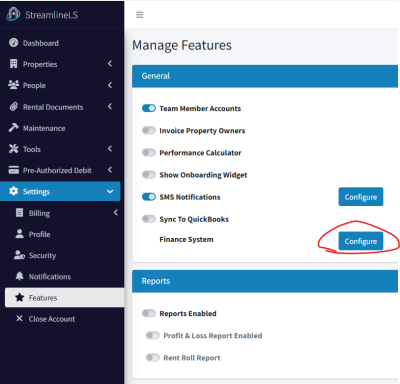
Start by enabling the feature. This can be found in Settings / Features, the Configure beside the Finance System row.
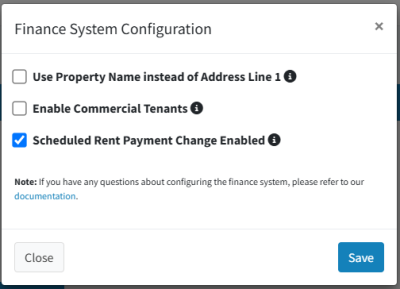
Then, enable this feature with the checkbox and click Save.
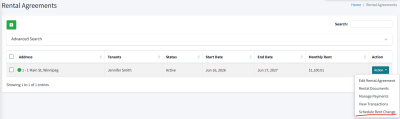
On the Rental Agreements page, there is now a Schedule Rent Change option in the Action menu.
The following dialog will be shown:
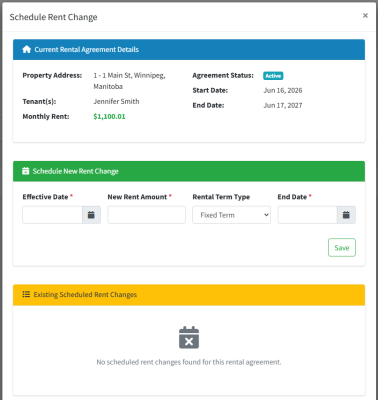
Enter in a new Effective Date (when the change will happen), the new rent amount, and a new end date and term type for the rental agreement.
As a note, the effective date is the date where you would normally log into the platform and make the change. For example, if you want the rent to be changed for September 1st, then the effective date must be at least one business day before that.
Once the rent payment change has been scheduled, you’ll see it listed here:
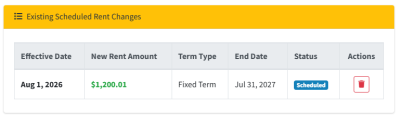
You can delete it up to 10:00 AM CST on the effective date.
You will now see this clock icon on the Rental Agreements page, beside Monthly Rent:
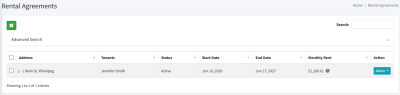
The tenant will see something similar in their portal.
Notifications
You will receive a notification when the payment change has been applied. This happens at 10:00 AM CST on the effective date (or the business day before, if it’s on a weekend/holiday).
Your tenant will receive a notification when the scheduled rent change has been created. This is so they can reach out if something doesn’t look correct.