
Scheduled Rent Payment Changes

This feature enables a landlord or property manager to schedule a change to the rental amount for a future date.  A common use case would be for processing lease renewals.  Since this typically happens a few months ahead of time, you can use this feature to schedule the rent payment change ahead of time.

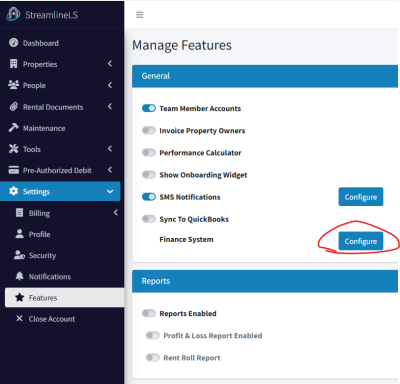
Start by enabling the feature.  This can be found in Settings / Features, the Configure beside the Finance System row.
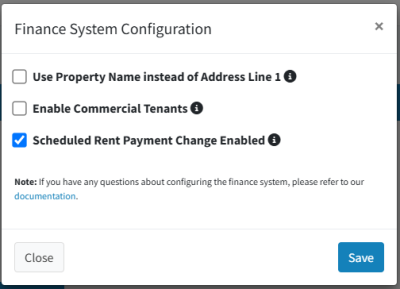
Then, enable this feature with the checkbox and click Save.
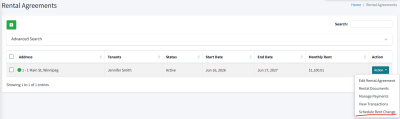
On the Rental Agreements page, there is now a Schedule Rent Change option in the Action menu.
The following dialog will be shown:
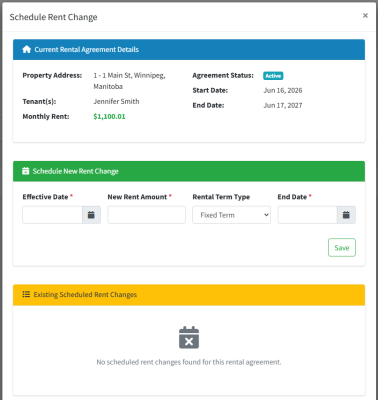
Enter in a new Effective Date (when the change will happen), the new rent amount, and a new end date and term type for the rental agreement.

As a note, the effective date is the date where you would normally log into the platform and make the change.  For example, if you want the rent to be changed for September 1st, then the effective date must be at least one business day before that.

Once the rent payment change has been scheduled, you’ll see it listed here:
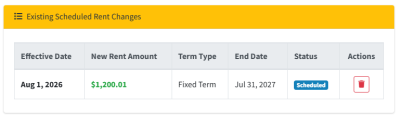
You can delete it up to 10:00 AM CST on the effective date.

You will now see this clock icon on the Rental Agreements page, beside Monthly Rent:
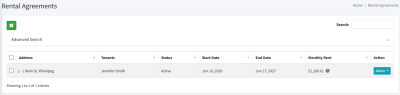
The tenant will see something similar in their portal.

Notifications

You will receive a notification when the payment change has been applied.  This happens at 10:00 AM CST on the effective date (or the business day before, if it’s on a weekend/holiday).

Your tenant will receive a notification when the scheduled rent change has been created.  This is so they can reach out if something doesn’t look correct.


Landlord Help Articles

Automated Rent Collection Software in Canada

Get Paid on Time, Every Time Forget chasing tenants and late payments. StreamlineLS automatically collects rent via PAD from any Canadian bank and deposits it straight into your account. Automatic PAD from any bank Email & SMS reminders Get...

read more

Tenant Verification Reports

Tenant Verification Reports What we refer to as a Tenant Verification Report (TVR) is a series of checks that will help you assess the risk that a prospective tenant represents.  The TVR is comprised of at least two checks: a Softcheck, and a...

read more

Property Manager Help Articles

Guide: Invoicing Property Owners

The StreamlineLS platform has a built-in feature that can automatically generate invoices to property owners each month, based on the configuration that you choose. This feature only applies to property managers. Enabling the Feature Start by...

read more

Tenant Help Articles

Filling out a Tenant Verification Report

Tenant Verification Reports When applying to rent a unit, it’s common practice to require a tenant screening.  This process usually includes a background check, credit check, and ID check.  The combination of these checks is what we refer to as a...

read more

Pre-Authorized Debit – Tenant Edition

Pre-Authorized Debit for Tenants If your landlord or property manager is using our platform to process rent payments, this guide will tell you everything you need to know. First, your property manager will need permission from you to make...

read more

Streamline Tenant Overview

Platform Overview for Tenants The Streamline Landlord Service platform (SLS) was created to help landlords and property managers better communicate with tenants.  From paying rent to submitting maintenance requests, we have set out to build a...

read more